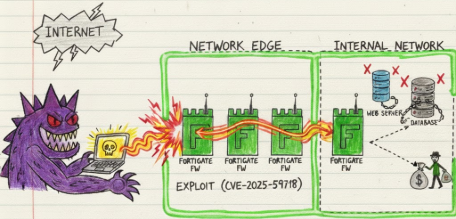
You know that feeling when you find out a critical enterprise security appliance will just accept any SAML response you throw at it, signature or not? Yeah, that’s where we are with CVE-2025-59718 and CVE-2025-59719. Fortinet dropped these two gems in December 2025, and within three days of disclosure, threat actors were already in production environments downloading config files like it was Black Friday.
Let’s talk about what happens when you forget that cryptographic signatures exist for a reason.
The Vulnerability(s)
CVE-2025-59718 and CVE-2025-59719 are essentially the same vulnerability affecting different Fortinet product lines. Both stem from improper verification of cryptographic signatures in SAML response messages used by FortiCloud Single Sign-On. In practical terms, these devices were accepting unsigned or improperly signed SAML assertions and handing out admin sessions like candy.
The vulnerability is classified as CWE-347 (Improper Verification of Cryptographic Signature), and it’s about as straightforward as authentication bypasses get. If FortiCloud SSO is enabled, an attacker can craft a SAML response with whatever identity they want, send it to the device, and the device just says “yeah sure, you’re the admin now.”
Both vulnerabilities carry a CVSS v3.1 score of 9.8, which tracks. Unauthenticated remote code execution to admin? That’s a critical any day of the week.
CVE-2025-59718 affects:
- FortiOS
- FortiProxy
- FortiSwitchManager
CVE-2025-59719 affects:
- FortiWeb
The root cause is identical - both involve the same signature verification failure in the SAML authentication flow, just implemented across different product codebases.
Timeline: The Speed Run
December 9, 2025: Fortinet publishes advisory FG-IR-25-647 and releases patches. Credit goes to Fortinet’s internal team members Yonghui Han and Theo Leleu for the discovery.
December 12, 2025: Arctic Wolf starts observing active exploitation in the wild. Threat actors are already authenticating as admin via SSO and downloading system configuration files from compromised FortiGate appliances. That’s 72 hours from disclosure to widespread exploitation.
December 16, 2025: CISA adds CVE-2025-59718 to the Known Exploited Vulnerabilities catalog with a remediation deadline of December 23, 2025 - just seven days.
December 17, 2025: Rapid7 observes exploitation attempts against their honeypots. Public PoC code starts appearing on GitHub.
The weaponization window on this one was basically nonexistent. By the time most organizations even read the advisory, attackers were already in.
Affected Versions and Patch Status
Here’s the damage report:
FortiOS:
- Vulnerable: 7.0.0 through 7.0.17, 7.2.0 through 7.2.11, 7.4.0 through 7.4.8, 7.6.0 through 7.6.3
- Fixed: Upgrade to 7.0.18, 7.2.12, 7.4.9, or 7.6.4 or later
- Not affected: 6.4 branch
FortiProxy:
- Vulnerable: 7.0.0 through 7.0.21, 7.2.0 through 7.2.14, 7.4.0 through 7.4.10, 7.6.0 through 7.6.3
- Fixed: Upgrade to 7.0.22, 7.2.15, 7.4.11, or 7.6.4 or later
FortiSwitchManager:
- Vulnerable: 7.0.0 through 7.0.5, 7.2.0 through 7.2.6
- Fixed: Upgrade to 7.0.6, 7.2.7, or later
FortiWeb:
- Vulnerable: 7.4.0 through 7.4.9, 7.6.0 through 7.6.4, 8.0.0
- Fixed: Upgrade to 7.4.10, 7.6.5, 8.0.1, or later
- Not affected: 7.0 and 7.2 branches
Proof of Concept Details
The public PoC that surfaced on GitHub demonstrates exactly how trivial this exploitation is. The attack flow is dead simple:
- Craft a SAML response with your chosen username (typically “admin”)
- Include proper XML structure but skip the signature or include an invalid one
- POST it to
/remote/saml/loginon the target device - Device accepts it without proper signature verification
- You’re now authenticated as that user with full privileges
The PoC includes functionality for:
- Single target or bulk scanning
- SAML token replay simulation
- Automatic configuration file download via
/api/v2/monitor/system/config/backup - Multi-threaded operation for mass exploitation
What makes this particularly nasty is that FortiCloud SSO is automatically enabled when administrators register devices to FortiCare via the GUI unless they explicitly disable it. Most admins never realized they were exposing this attack surface.
The default factory setting has FortiCloud SSO disabled, but the moment you go through the registration workflow without unchecking that box, you’re vulnerable. This created a massive exposure across enterprise Fortinet deployments.
Technical Deep Dive: The Exploitation Mechanics
Let’s get into the weeds of how this actually works.
SAML (Security Assertion Markup Language) is an XML-based protocol for exchanging authentication and authorization data between an identity provider and a service provider. The entire security model depends on cryptographic signatures to ensure assertions haven’t been tampered with.
In a proper SAML flow:
- User initiates authentication
- Identity Provider (IdP) generates a SAML assertion
- IdP signs the SAML response and/or assertion with its private key
- Service Provider (SP) receives the SAML response
- SP verifies the signature using IdP’s public certificate
- If signature is valid, SP trusts the assertion and creates a session
The vulnerability exists in step 5 - the signature verification. Fortinet’s FortiCloud SSO implementation was failing to properly validate that:
- A signature was present
- The signature was cryptographically valid
- The signature matched the expected IdP certificate
This means an attacker could send a completely unsigned SAML response, or one signed with a bogus key, and the device would process it as legitimate.
The SAML response structure attackers are exploiting looks something like this:
<samlp:Response xmlns:samlp="urn:oasis:names:tc:SAML:2.0:protocol">
    <saml:Assertion xmlns:saml="urn:oasis:names:tc:SAML:2.0:assertion">
        <saml:Subject>
            <saml:NameID>admin</saml:NameID>
        </saml:Subject>
        <saml:AttributeStatement>
            <saml:Attribute Name="username">
                <saml:AttributeValue>admin</saml:AttributeValue>
            </saml:Attribute>
        </saml:AttributeStatement>
    </saml:Assertion>
</samlp:Response>
The attacker controls the NameID and username fields. With no signature verification enforcing that these came from a legitimate IdP, you can just claim to be whoever you want.
What’s particularly interesting is the fix. In FortiOS 7.2.12, 7.4.9, and 7.6.4, Fortinet added enforcement that SAML response messages must have valid signatures. They also added a configuration option in 7.6.5 to control whether both the response and assertion must be signed:
config user saml
    edit <n>
        set require-signed-resp-and-asrt <enable | disable>
    next
end
The default is enable, meaning both must be signed. This is the correct behavior that should have existed from day one.
The patch essentially added the signature verification logic that was completely missing or broken. It now:
- Checks that a signature element exists
- Validates the signature cryptographically
- Verifies it matches the configured IdP certificate
- Rejects the SAML response if any check fails
Forensic Data Collection
- If virtual Forti –> Export the VMDK
- If baremetal –> Contact FortiSupport and request assistance. Will likely need to ship the device back to Forti for the image (We’ve seen success doing this)
- Try some Forti triage commands –> Secret gist
- Revert the Forti version and exploit it yourself to get a root session –> Generate a forensic image using your choice of dd* and collect memory using avml
Forensic Considerations and Limitations
Here’s where things get dicey from an incident response perspective: this attack leaves minimal forensic evidence.
What you WILL see:
- Successful admin login events via SSO method
- Log entries showing
method="sso"authentication - GUI actions performed by the admin user
- Configuration file downloads if the attacker exfiltrated configs
What you WON’T see:
- Evidence of the malicious SAML payload itself (not logged)
- Failed authentication attempts (successful bypass on first try)
- Source of the SAML forgery (appears as legitimate SSO)
- Modification to audit logs (attacker could disable logging post-compromise)
The observed attack pattern from Arctic Wolf shows this log signature:
logid="0100032001" type="event" subtype="system" level="information"
logdesc="Admin login successful" user="admin" ui="sso(199.247.7.82)"
method="sso" srcip=199.247.7.82 action="login" status="success"
profile="super_admin"
Followed by:
logid="0100032095" type="event" subtype="system" level="warning"
logdesc="Admin performed an action from GUI" user="admin"
ui="GUI(199.247.7.82)" action="download" status="success"
msg="System config file has been downloaded"
Critical forensic limitation: If an attacker authenticated via this vulnerability and immediately disabled logging or modified the syslog configuration, you might have zero visibility into what they did post-compromise.
Additionally, downloaded configuration files contain:
- Hashed local account passwords
- VPN credentials
- Certificate private keys
- SNMP community strings
- IPsec PSKs
If your config was exfiltrated, assume all credentials in it are compromised. The hashes can be cracked offline, and weak passwords will fall quickly to dictionary attacks.
What we’ve observed in the wild:
- Attackers authenticate as admin
- Immediate download of system config
- Quick in-and-out pattern (3-5 minute dwell time)
- No persistence mechanisms observed (yet)
- Focus on credential harvesting from configs
This suggests initial access operations, likely for follow-on attacks. Stolen credentials enable:
- VPN access to internal networks
- Lateral movement to other Fortinet devices
- Access to networks the firewall protects
- Identity for supply chain attacks
Forensic Evidence Collection
When exploitation is suspected or confirmed, evidence collection needs to happen fast. FortiGate logs rotate, memory is volatile, and attackers with admin access can disable logging or wipe evidence. The following methods preserve forensic artifacts before they disappear.
Collection Priority Order
Time matters. The forensic window closes fast. If you can’t collect everything immediately:
- System logs - Rotate fastest, contain authentication and admin action evidence
- Memory dump - Most volatile, shows active sessions and in-memory configurations
- Configuration backup - Shows what the attacker could access or modify
- Disk image - Time-consuming but comprehensive preservation
- Network flow logs - May show data exfiltration or C2 communication
- External SIEM data - If forwarding was enabled and not disabled by attacker
Logs rotate. Sessions expire. Attackers clean up. Collect what matters first.
FortiGate Log Extraction
FortiGate devices store logs in memory and disk depending on configuration. Critical for CVE-2025-59718 investigations because they contain the only evidence of SSO authentication and post-compromise actions.
Export all event logs:
# Via CLI - exports to TFTP/FTP server
execute backup disk full-config tftp <filename> <tftp_server_ip>

# Export system logs to USB (if available)
execute backup disk full-log usb <filename>

# Export logs via SCP (requires SSH enabled)
execute backup disk alllogs scp <filename> <scp_server_ip>:<path> <username>
Export specific log categories:
# Export only system event logs (authentication, admin actions)
execute log filter category 0
execute log filter field subtype system
execute log display
execute log export tftp <filename> <tftp_server>

# Export traffic logs (network connections)
execute log filter category 1
execute log display
execute log export tftp <filename> <tftp_server>

# Export security logs (IPS, AV, etc.)
execute log filter category 2
execute log display
execute log export tftp <filename> <tftp_server>
Check log storage locations:
# Show current log storage settings
diagnose sys top-summary

# Check disk space and log usage
get system status

# Show logging configuration
show log setting
show log syslogd setting
show log fortianalyzer setting
Critical logs for CVE-2025-59718:
- Event logs (category 0) - Contains SSO login and admin action events
- Admin login history - Shows authentication method and source IPs
- Configuration change logs - Shows if attacker modified settings
- Download logs - Critical for detecting config file exfiltration
If using FortiAnalyzer or Syslog:
Logs may be preserved externally even if local logs are cleared:
# Check if FortiAnalyzer is configured
get log fortianalyzer setting

# Check if syslog forwarding is active
get log syslogd setting

# Verify last successful log upload
diagnose test application miglogd 4
If external logging was active, immediately secure those log stores before the attacker accesses them.
Memory Acquisition
Memory contains active sessions, cached credentials, in-memory configurations, and runtime state that doesn’t exist on disk. For FortiGate investigations, memory is critical because it may contain:
- Active admin session tokens and cookies
- SAML response processing artifacts
- Cached configuration changes not yet written to disk
- Network connection states
- Process memory showing what the attacker accessed
Physical FortiGate Appliance Memory Dump:
FortiGate devices run FortiOS (a hardened Linux kernel). Direct memory access requires specific procedures:
- Remember that ProcFS is mounted and you can review it via fnsysctl cat/ls commands
# Check available memory
diagnose hardware deviceinfo mem

# Enable core dump (requires reboot)
diagnose debug enable
diagnose debug core-dump enable

# Trigger controlled crash to generate core dump (USE WITH EXTREME CAUTION)
# This will reboot the device - only use if authorized
diagnose debug crash
Core dumps are stored in /data/core/ and can be extracted via SCP or USB.
VM-based FortiGate (FortiGate-VM) Memory Dump:
For virtual appliances, use hypervisor snapshot capabilities:
# VMware ESXi - suspend to capture memory
vim-cmd vmsvc/power.suspend <vmid>
# Memory saved to .vmss file in VM directory
# Resume after copying: vim-cmd vmsvc/power.on <vmid>

# Hyper-V memory dump
Stop-VM -Name FortiGateVM -Save
# Memory saved to .bin and .vsv files
Start-VM -Name FortiGateVM

# KVM/QEMU memory dump
virsh dump <domain> /forensics/fortigate-memory.dump --memory-only --live

# AWS EC2 (if EBS-backed)
# Create snapshot, then extract from snapshot volume
aws ec2 create-snapshot --volume-id vol-xxxxx --description "FortiGate forensics"
Alternative: Configuration and Session State Extraction:
If full memory dump isn’t possible, extract runtime state:
# Dump current configuration (includes all settings)
show full-configuration

# Show active admin sessions
diagnose sys session list

# Show cached certificates and keys
diagnose vpn ssl list

# Show SAML configuration and status
diagnose debug application samld -1
diagnose debug enable
# Let it run for 30 seconds to capture SAML processing
diagnose debug disable
diagnose debug reset
Disk Imaging
Disk images preserve FortiGate system files, logs, configuration, and forensic artifacts. For CVE-2025-59718, disk imaging captures:
- Complete log history before rotation (
/var/log/) - System configuration files (
/data/config/) - Certificate stores and private keys
- Historical configuration versions
- System binaries and potential persistence mechanisms
Physical Appliance Disk Imaging:
Physical FortiGate devices use internal storage (SSD/HDD). Imaging requires physical access; if this is impossible or risk is not accepted to crack open the device; consider working with FortiSupport to have a bitwise image generated after shipping the entire device
# Using dc3dd (forensically sound)
sudo dc3dd if=/dev/sdb of=/forensics/fortigate-disk.img hash=sha256 log=/forensics/imaging.log

# Using dd and dumping output to a remote host (Few methods)
dd if=/dev/<source> bs=16M | ssh <user>@<host> “/bin/dd of=/path/to/save/<device_name>.dd bs=16M”
dd if=/dev/<root device> bs=5M conv=fsync status=progress | gzip -c -9 | ssh <user>@<DestinationIP> 'gzip -d | dd of=<device_name>.dd bs=5M'
VM-based FortiGate Disk Imaging:
For virtual appliances, snapshot the virtual disks:
# VMware - Clone VMDK files
vmkfstools -i fortigate.vmdk fortigate-forensic.vmdk

# Hyper-V - Export VM disks
Export-VM -Name FortiGateVM -Path C:\Forensics\

# KVM/QEMU - Copy qcow2 images
cp /var/lib/libvirt/images/fortigate.qcow2 /forensics/fortigate-forensic.qcow2

# AWS EC2 - Create AMI or snapshot
aws ec2 create-image --instance-id i-xxxxx --name "FortiGate-Forensic-Image"
# Or snapshot specific volumes
aws ec2 create-snapshot --volume-id vol-xxxxx --description "FortiGate forensics"

# Azure - Create managed disk snapshot
az snapshot create --resource-group myRG --name fortigate-snap --source /subscriptions/.../disks/fortigate-disk

# GCP - Snapshot persistent disk
gcloud compute disks snapshot fortigate-disk --snapshot-names=fortigate-forensic --zone=us-central1-a
Live Backup (If Device Can’t Be Taken Offline):
If the FortiGate must remain operational:
# Full configuration backup (includes encrypted passwords)
execute backup full-config tftp backup.conf <tftp_server>

# Or via SCP (preferred for security)
execute backup full-config scp backup.conf <user>@<server>:<path>

# Full disk backup (includes logs, firmware)
execute backup disk full-config tftp full-backup.img <tftp_server>

# Verify backup integrity
execute restore verify tftp backup.conf <tftp_server>
Configuration Files
Configuration reveals what was enabled during the exploitation window and what the attacker could access or modify.
Critical FortiGate configurations:
- Full system configuration (contains all settings, VPN configs, certificates)
- SAML SSO configuration (IdP settings, certificate trusts)
- Admin account configurations (users, permissions, trusted hosts)
- Logging configuration (shows if attacker disabled logging)
- VPN configurations (IPsec, SSL-VPN credentials)
- Certificate stores (private keys, CA certificates)
Triage Extract via CLI: For a starting triage and forensic command reference, see our FortiGate triage command collection at https://gist.github.com/gottlabs/4fdc425bd8c50944e9a5c67806d7639c. It includes system integrity checks, process enumeration, filesystem inspection, and network state collection commands useful during incident response.
Configuration file locations on disk:
/data/config/sys_global.conf- Global system configuration/data/config/fgt.conf- Main FortiGate configuration/etc/init.d/- Service configurations/data/- Data directory containing logs and configs
System logs and forensic artifacts:
/var/log/log- Main event log file/var/log/log.*- Rotated log files/data/var/log/- Persistent log storage/var/log/message- System messages/var/tmp/- Temporary files (may contain session data)
Certificate and key stores:
/data/etc/cert/- Certificate storage/data/etc/ssl/- SSL certificates and keys/etc/cert/- System certificates
External SIEM/Log Aggregation
If FortiGate was forwarding logs to external systems:
FortiAnalyzer logs:
- May contain complete event history even if local logs cleared
- Check for SSO authentication events with method=”sso”
- Review configuration change logs
- Analyze traffic logs for post-compromise behavior
Syslog servers:
- Preserve logs even if FortiGate compromised
- Search for logid 0100032001 (admin login) with method=”sso”
- Search for logid 0100032095 (config download)
- Correlate with other security events
Detection and Hunting
Given the forensic limitations, detection relies heavily on behavioral analytics and log correlation.
Primary detection logic:
Hunt for SSO authentication followed by configuration downloads:
event="Admin login successful" AND method="sso"
FOLLOWED BY
action="download" AND msg CONTAINS "config file"
WITHIN 15 minutes
Look for admin actions from unexpected source IPs:
user="admin" AND method="sso"
WHERE srcip NOT IN [known_admin_ips]
Detect FortiCloud SSO logins outside normal business hours:
method="sso" AND (hour < 6 OR hour > 20)
AND day IN [Saturday, Sunday]
Check for multiple admin logins from different IPs in short timeframes:
COUNT(DISTINCT srcip) WHERE method="sso" AND user="admin"
GROUP BY 15_minute_window
HAVING count > 1
Configuration audit:
show system global | grep admin-forticloud-sso-login
If this returns enable, you’re exposed (assuming vulnerable version).
Log queries to hunt for historical compromise:
# All SSO logins in the past 30 days
execute log filter category 0
execute log filter field subtype system
execute log filter field action login
execute log filter field method sso
execute log display
# Configuration downloads
execute log filter category 0
execute log filter field action download
execute log display
Network-based detection:
Monitor for POST requests to /remote/saml/login with SAML payloads lacking proper signatures. This requires SSL inspection capabilities and deep packet inspection of SAML XML structure.
YARA rule for SAML responses in network traffic:
rule CVE_2025_59718_SAML_Exploit {
    strings:
        $saml1 = "samlp:Response" nocase
        $saml2 = "Assertion" nocase
        $saml3 = "NameID" nocase
        $endpoint = "/remote/saml/login" nocase
    condition:
        all of them and not (
            $sig1 = "ds:Signature" or
            $sig2 = "SignatureValue"
        )
}
Endpoint forensics:
Check web server logs on the FortiGate:
execute log filter category 1
execute log filter field action login
execute log display
Review historical SAML authentication attempts:
diagnose debug application samld -1
diagnose debug enable
Note: This won’t show historical events, only new ones while debug is enabled.
Remediation and Workarounds
Immediate action required:
- Disable FortiCloud SSO (if patches can’t be applied immediately):
Via GUI:
System -> Settings -> Disable "Allow administrative login using FortiCloud SSO"
Via CLI:
config system global
    set admin-forticloud-sso-login disable
end
- Verify the setting:
show system global | grep admin-forticloud-sso-login
Should return: set admin-forticloud-sso-login disable
- Restrict management access:
config system admin
 edit admin
     set trusthost1 <trusted_subnet> <netmask>
 next
end
Limit admin GUI access to specific trusted networks only. Don’t expose management to the internet.
Patch upgrade path:
Use Fortinet’s upgrade tool to determine safe upgrade paths. Some versions require intermediate upgrades. For example, FortiOS 7.0.17 can’t directly upgrade to 7.6.4 - you need to go through 7.0.18 first.
Recommended upgrade sequence:
- Back up current configuration
- Test upgrade in non-production environment
- Schedule maintenance window
- Upgrade during low-traffic period
- Verify FortiGuard service connectivity post-upgrade
- Re-enable FortiCloud SSO only if required
Post-patch validation:
After patching, verify SAML signature enforcement is active:
config user saml
    edit <saml_config_name>
        get
    next
end
Look for set require-signed-resp-and-asrt enable in versions 7.6.5+.
Assessment and Impact
CVE-2025-59718 and CVE-2025-59719 represent everything wrong with authentication bypass vulnerabilities in critical infrastructure devices. The combination of factors makes this particularly nasty:
Attack complexity: Low. Send a crafted HTTP POST request, get admin access. Privilege required: None. Completely unauthenticated. User interaction: None. No social engineering required. Exploitability: Trivial. Public PoC available, observed exploitation within 72 hours. Impact: Complete device compromise with admin privileges.
The vulnerability is especially dangerous because FortiCloud SSO is silently enabled during device registration, a workflow most administrators don’t associate with opening security holes. This created widespread exposure without explicit admin awareness.
The 72-hour window from disclosure to active exploitation demonstrates that threat actors have mature capabilities for rapid weaponization. This wasn’t script kiddies fumbling around - it was organized groups with infrastructure ready to go.
The targeting of configuration files suggests credential harvesting for persistent access and lateral movement. Expect these stolen credentials to be used in follow-on attacks for months to come.
Bottom line: If you run Fortinet devices with FortiCloud SSO enabled on vulnerable versions, assume compromise until proven otherwise. Patch immediately, disable the feature if you can’t patch, and hunt through logs for signs of exploitation.
The fact that this vulnerability existed in a security appliance’s authentication mechanism - the thing literally designed to verify identity - is ironic in the worst way possible. It’s 2025 and we’re still seeing basic cryptographic verification failures in enterprise security products.
SAML isn’t new. Signature verification isn’t rocket science. This should never have made it to production.