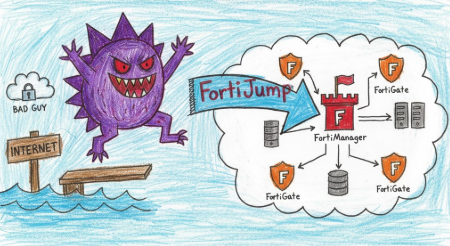
So here’s the thing about CVE-2024-47575. While everyone was busy patching their FortiGates and worrying about the latest whatever-just-dropped vulnerability, somebody forgot to lock the door on FortiManager. Not metaphorically. Actually forgot. No authentication required, just walk right in with a certificate you can pull from literally any FortiGate device (or VM) and suddenly you’re root on the thing managing everyone’s firewalls.
The irony writes itself.
The Vulnerability
CVE-2024-47575 is a missing authentication vulnerability in FortiManager’s fgfmd daemon, which handles the FortiGate to FortiManager (FGFM) protocol over TCP port 541. With a CVSS score of 9.8, this wasn’t just critical, it was catastrophic. The flaw allowed remote unauthenticated attackers to execute arbitrary code or commands through specially crafted requests.
Fortinet disclosed this on October 23, 2024, but here’s the kicker: Mandiant tracked exploitation back to June 27, 2024, by threat cluster UNC5820. That’s four months of zero-day fun where attackers were mass-harvesting FortiGate configurations, credentials, and basically anything not nailed down.
Timeline: When Things Went Sideways
Let’s walk through how this played out, because the timeline matters when you’re trying to figure out if you got owned:
- June 27, 2024: Mandiant observes first exploitation attempt. Multiple FortiManager devices receive inbound connections from 45.32.41.202 on TCP/541. Shortly after, the file
/tmp/.tmappears, a gzip-compressed archive containing FortiGate configuration data. This is your “patient zero” moment. - September 22, 2024: Second wave of exploitation confirmed. Same patterns, same IOCs, different victims. Darktrace analysts note a lag between initial access and data exfiltration, suggesting reconnaissance before payload deployment.
- October 13, 2024: Fortinet privately notifies affected customers. Props for the heads-up, but by now the cat’s been out of the bag for months.
- October 23, 2024: Public disclosure via FG-IR-24-423. CISA adds CVE-2024-47575 to KEV catalog. Everyone scrambles.
- November 14, 2024: watchTowr releases full PoC with device certificates, effectively democratizing exploitation. They also discover “FortiJump Higher,” a post-auth variant Fortinet didn’t properly patch.
Impacted Versions and Patch Status
If you’re running FortiManager, here’s what you need to know:
Vulnerable Versions:
- FortiManager 7.6.0
- FortiManager 7.4.0 through 7.4.4
- FortiManager 7.2.0 through 7.2.7
- FortiManager 7.0.0 through 7.0.12
- FortiManager 6.4.0 through 6.4.14
- FortiManager 6.2.0 through 6.2.12
- FortiManager Cloud 7.4.1 through 7.4.4
- FortiManager Cloud 7.2.1 through 7.2.7
- FortiManager Cloud 7.0.1 through 7.0.12
- FortiManager Cloud 6.4 (all versions)
Old FortiAnalyzer models (1000E, 1000F, 2000E, 3000E, 3000F, 3000G, 3500E, 3500F, 3500G, 3700F, 3700G, 3900E) with FortiManager-on-FortiAnalyzer enabled and at least one interface with fgfm service enabled are also vulnerable.
Forensic Data Collection
- Export the VMDK from -Insert your Virtualization App-
- Try some Forti triage commands (ProcFS is mounted and you can review it via fnsysctl) –> Secret gist
Proof of Concept: How It Actually Works
The exploitation chain is deceptively simple, which makes it scarier:
-
Certificate Acquisition: Extract device certificate from any FortiGate appliance. These are stored in
/etc/fgt.crtand/etc/fgt.keyon FortiGate VMs. The certificate must be signed by Fortinet’s CA, but that’s not a high bar when you can pull one from demo VMs. -
Connection: Establish TLS connection to FortiManager on TCP/541 using the extracted certificate.
-
Registration: Send a
get authrequest with a serial number. The device appears in “Unauthorized Devices” but this doesn’t stop exploitation. -
Exploitation: Send a
get connect_tcprequest withtcp_port=rshandcmd=/bin/sh. FortiManager opens a channel and pipes shell I/O through it. -
Root Access: Execute arbitrary commands with root privileges. No password, no challenge, no logging (if you do it right).
Here’s the smoking gun from Rapid7’s analysis. The vulnerable code path checks for the tcp_port=rsh parameter and if present, executes whatever’s in the cmd parameter via execve:
if ( !strcmp(v20, "rsh") )
{
    v61 = (*(__int64 (__fastcall **)(__int64, char *))(*(_QWORD *)(a2 + 24) + 80LL))(a2, "cmd");
    // ... snip ...
    CMD_ARG = (*(__int64 (__fastcall **)(__int64, const char *))(*(_QWORD *)(a2 + 24) + 80LL))(a2, "cmd_arg");
    // ... execution via system() call ...
}
watchTowr’s PoC demonstrates this beautifully. They found a command injection in the som/export function that calls system() without sanitizing inputs:
snprintf(s, 0x200uLL, "cp %s %s", srcFilename, *_destFilename);
returnCode = system(s);
Backticks and you’re in.
Technical Analysis: The Exploitation
Let’s get into what actually happens when this gets exploited, because understanding the mechanics matters for detection and response.
The FGFM Protocol
FGFM is Fortinet’s proprietary protocol for FortiGate-to-FortiManager communication. It runs over TLS on TCP/541 and uses a simple binary header (magic 0x36E01100 followed by length) with ASCII commands and newline-delimited parameters.
A typical request looks like:
36e01100 0000006g get connect_tcp
chan_window_sz=32768
deflate=gzip
devid=167
localid=29469
tcp_port=80
The server responds with:
channel
action=ack
remoteid=29469
localid=2208
chan_window_sz=32768
deflate=gzip
This opens a bidirectional channel for data exchange. Legitimate use: configuration synchronization. Exploitation use: shell access.
The Command Injection
The vulnerability stems from missing authentication checks in the fgfmsd daemon. When processing get connect_tcp requests with tcp_port=rsh, the daemon extracts cmd, cmd_arg, and cmd_env parameters and passes them to a function that ultimately calls execve without proper validation:
__int64 __fastcall sub_1A122(int fd, int a2, int a3, const char *cmd, char *const *args, char *const *env)
{
    // ... setup terminal and file descriptors ...
    dup2(a2, 0);
    dup2(a2, 1);
    dup2(a2, 2);
    return execve(cmd, args, env);
}
Input and output get piped through the FGFM channel, providing interactive shell access. The attacker can send commands and receive output over an encrypted channel that network monitoring won’t catch without TLS inspection.
The FortiJump Higher Variant
watchTowr discovered something interesting: Fortinet’s 7.6.1 patch added authentication checks, but only for the rsh code path. They found a different command injection in som/export that remained unpatched:
if ( *((_DWORD *)_destFilename + 4) == 12 )
{
    srcFilename = "/var/fds/data/som_cus.dat";
    if ( access(srcFilename, 0) )
        srcFilename = "/fdsroot/data/etc/som.dat";
    snprintf(s, 0x200uLL, "cp %s %s", srcFilename, *_destFilename);
    returnCode = system(s);
}
This variant requires an authenticated device connection but still allows privilege escalation from any compromised FortiGate to FortiManager. The implications: chain this with any FortiGate 0-day and you own the entire managed infrastructure.
What Was Seen in the Wild
Based on Mandiant and Darktrace reporting, here’s the actual attack pattern:
-
Initial Access: Inbound connection from known malicious IP (45.32.41.202, 158.247.199.37, 195.85.114.78) on TCP/541.
- Data Staging: Creation of
/tmp/.tmarchive containing:/fds/data/subs.dat/fds/data/subs.dat.tmp- Configuration data from ALL managed FortiGates
-
Exfiltration: HTTP POST to attacker-controlled infrastructure. Darktrace noted consistent user agent
curl 8.4.0, suggesting command-line tooling. -
Lag Period: Significant time gap between initial access and exfiltration, indicating reconnaissance or selective targeting.
- No Lateral Movement: Despite having credentials and network maps, UNC5820 showed no evidence of pivoting to managed FortiGates or enterprise networks. This suggests either extreme operational security or limited scope of objectives.
Host-Based Detection
FortiManager System Logs:
Monitor for these specific events:
grep -E "Added unregistered device|unauthorized device|changes=" /var/log/fgtlog.log
Look for:
dvm.status="added_unauth"in event logsoperation="Add device"with unexpected device nameschangesfield containing “Unregistered”
Process Monitoring:
Watch for unexpected child processes under fgfmsd:
- Shell spawning (
/bin/sh,/bin/bash) - Command execution via
execvewith network I/O - Curl or wget activity from FortiManager
Closing Assessment
CVE-2024-47575 represents a fundamental failure in secure-by-default design. Missing authentication on a critical management function in an enterprise security appliance is not just a vulnerability, it’s a catastrophic oversight. The fact that it took four months from first exploitation to public disclosure is concerning, but not surprising given the challenge of detecting this type of attack without proper logging and monitoring.
The real story here isn’t just the technical details of the exploit. It’s the forensic blind spot it creates. UNC5820 operated with surgical precision: in, grab the data, out, clean up, leave no trace. For organizations trying to determine if they were compromised, the answer is often a frustrating “we can’t tell.” Without audit logging enabled, without network monitoring on TCP/541, without memory forensics at the time of compromise, the evidence simply doesn’t exist.
This is what makes supply chain and management plane attacks so insidious. Compromise the thing managing your security devices and you don’t just own one box, you own the entire infrastructure. You get configuration data, credentials, network topology, everything you need to move laterally at will. And because it’s the management plane, defensive teams often don’t monitor it as aggressively as they should.
The silver lining: this type of attack requires positioning and capabilities that limit it to sophisticated threat actors. The certificate requirement, the protocol knowledge, the operational security needed to avoid detection, these aren’t script kiddie tools. But the PoC is public now, complete with certificates, which democratizes exploitation. Any competent red team or mid-tier threat group can now add this to their playbook.
For defenders, the message is clear: patch, segment, monitor, and verify. Then do it again. Because in this threat landscape, trust but verify isn’t enough. You just verify.
References
- Fortinet Security Advisory FG-IR-24-423
- Mandiant: Investigating FortiManager Zero-Day Exploitation
- watchTowr: Hop-Skip-FortiJump-FortiJump-Higher
- Rapid7: Technical Analysis and Metasploit Module
- Bishop Fox: A Deeper Look at FortiJump
- watchTowr GitHub: FortiJump Exploit PoC
- Fortinet: FGFM Protocol Communications Guide